Choosing a motherboard in 2026 is more confusing than ever. Intel has Z790 for enthusiasts and B760 for mainstream builds, while AMD offers X670E at the top and B650 for the sweet spot. VRM quality, PCIe 5.0 support, WiFi 6E, and DDR5 compatibility all vary wildly — even within the same chipset tier. We tested five of the best-selling motherboards across both platforms to cut through the marketing noise.
Whether you're pairing a Ryzen 7 7800X3D with a premium AM5 board, building a mid-range LGA1700 rig around the i5-13600K, or looking for the cheapest way to get into a new platform, this guide tells you exactly which motherboard to buy at each price point — and which ones to avoid.
Quick Verdict — Best Gaming Motherboard 2026
01 — ASUS ROG STRIX Z790-A Gaming WiFi DDR5
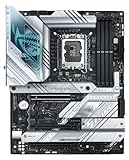
ASUS ROG STRIX Z790-A Gaming WiFi DDR5 BEST OVERALL
The Z790-A is the sweet spot in ASUS's ROG lineup — premium enough to handle an overclocked i9-14900K without thermal throttling on the VRM, but priced $120 below the Maximus Hero. The 18+1 power stage configuration delivers clean, stable power delivery even under sustained Cinebench all-core loads. PCIe 5.0 support on both the primary x16 slot and the top M.2 slot means you're fully future-proofed for next-gen GPUs and the fastest PCIe 5.0 NVMe SSDs like the Crucial T705.
WiFi 6E and Bluetooth 5.3 are onboard, the rear I/O panel is pre-mounted, and the BIOS is among the best in the industry — intuitive for beginners, with deep overclocking controls for enthusiasts. If you're building around an i7-14700K or i9-14900KS, this is the board we'd reach for first.
✓ Pros
- Excellent 18+1 VRM for i9 OC
- PCIe 5.0 M.2 + GPU slot
- Thunderbolt 4 on rear I/O
- Best-in-class ASUS BIOS
- WiFi 6E + BT 5.3
✗ Cons
- ~$280 is a lot for B760 budget builds
- No PCIe 5.0 on second M.2
- ATX only — no mATX option in Z790-A line
02 — MSI MAG B650 TOMAHAWK WiFi
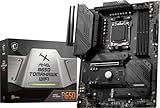
MSI MAG B650 TOMAHAWK WiFi BEST AMD
For AMD Ryzen 7000 builds, the MSI MAG B650 TOMAHAWK WiFi hits the ideal balance of features, VRM quality, and price. Its 14+2+1 power design handles Ryzen 9 7950X loads without breaking a sweat, and the top M.2 slot supports PCIe 5.0 — giving you access to the fastest SSDs available while saving money by opting for B650 instead of X670E. Three M.2 slots mean you'll never run out of fast storage options.
WiFi 6E and a solid rear I/O with USB-C 3.2 Gen 2 round out the package. The TOMAHAWK has been MSI's most reliable mid-range board for years — the AM5 version continues that tradition. If you're pairing this with a Ryzen 7 7800X3D or Ryzen 9 7900X, you're getting 95% of the X670E experience at 60% of the price.
✓ Pros
- Strong VRM for Ryzen 9
- PCIe 5.0 M.2 slot
- WiFi 6E included
- 3× M.2 slots
- Proven reliable platform
✗ Cons
- No PCIe 5.0 on GPU slot (B650 limit)
- Fewer USB ports than X670E boards
- No Thunderbolt
03 — MSI MAG B760M Mortar WiFi DDR5
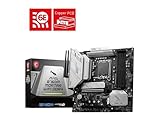
MSI MAG B760M Mortar WiFi DDR5 BEST VALUE
At $140, the MSI MAG B760M Mortar WiFi DDR5 is one of the best values in the LGA1700 ecosystem. The mATX form factor keeps costs down without cutting the features that matter most — WiFi 6E, DDR5 support up to 7200MHz (OC), and a 12+1+1 power stage that's more than sufficient for an i5-13600K running at 125W PL1. Two M.2 slots with PCIe 4.0 speeds cover all current NVMe drives.
This is the board we'd pair with an i5-13600K or i7-13700 for a compact, capable gaming build. The compact footprint fits smaller cases, and MSI's Click BIOS 5 makes setup painless. If you don't need the overclocking headroom of Z790, the B760M Mortar gives you nearly the same gaming experience for $100 less.
✓ Pros
- Excellent price-to-feature ratio
- WiFi 6E at $140
- DDR5 support up to 7200MHz OC
- Compact mATX footprint
✗ Cons
- No PCIe 5.0 support
- mATX — fewer expansion slots
- VRM limits very heavy i9 OC
04 — ASUS PRIME B650-PLUS
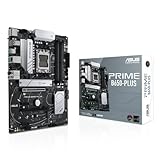
ASUS PRIME B650-PLUS AMD BUDGET
The ASUS PRIME B650-PLUS is the most affordable way to enter the AM5 platform with an ATX board that still supports PCIe 5.0 on the primary M.2 slot. At $150, it pairs well with Ryzen 5 7600 and Ryzen 7 7700X — the 10+2 power stage is adequate for non-overclocking Ryzen 7 builds, and ASUS's BIOS has excellent AI overclocking that handles DDR5 XMP automatically.
The lack of WiFi is the main compromise at this price — you'll need a separate WiFi adapter or an Ethernet cable. But if you're wired, this is a rock-solid AM5 foundation that will support Ryzen 8000 (Zen 5) CPUs on the same socket — future-proofing your platform longer than LGA1700.
✓ Pros
- Cheapest ATX AM5 board worth buying
- PCIe 5.0 M.2 slot
- AM5 platform longevity
- ASUS BIOS quality
✗ Cons
- No WiFi — need add-on card
- VRM limits high-end Ryzen 9
- Only 2× M.2 slots
05 — MSI PRO H610M-E DDR4
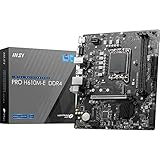
MSI PRO H610M-E DDR4 ULTRA BUDGET
At $75, the MSI PRO H610M-E DDR4 is strictly a budget option — but it's a good one. Paired with an Intel i3-12100 or i5-12400F, it delivers a fully functional gaming system for well under $400 total build cost. The H610 chipset locks out overclocking and limits memory support to DDR4-3200 officially, but for gaming at 1080p that's entirely sufficient.
The single M.2 PCIe 4.0 slot handles a fast NVMe SSD, and the board handles standard 65W and 125W Intel CPUs without issue. There's no WiFi, no Thunderbolt, and limited USB ports — but at this price, those are expected compromises. For office builds and entry-level gaming PCs, this board does exactly what it needs to.
✓ Pros
- Extremely affordable
- Reliable for non-OC i3/i5
- 1× M.2 PCIe 4.0
- Low power, runs cool
✗ Cons
- No overclocking support
- DDR4 only (no DDR5)
- No WiFi
- Limited to 2 SATA ports
Full Comparison Table
| Motherboard | Socket | Chipset | DDR | VRM | PCIe 5.0 | WiFi | M.2 Slots | Price |
|---|---|---|---|---|---|---|---|---|
| ASUS ROG STRIX Z790-A TOP | LGA1700 | Z790 | DDR5 | 18+1 | GPU + M.2 | WiFi 6E | 4 | ~$280 |
| MSI MAG B650 TOMAHAWK WiFi | AM5 | B650 | DDR5 | 14+2+1 | M.2 only | WiFi 6E | 3 | ~$200 |
| MSI MAG B760M Mortar WiFi DDR5 VALUE | LGA1700 | B760 | DDR5 | 12+1+1 | No | WiFi 6E | 2 | ~$140 |
| ASUS PRIME B650-PLUS | AM5 | B650 | DDR5 | 10+2 | M.2 only | No | 2 | ~$150 |
| MSI PRO H610M-E DDR4 | LGA1700 | H610 | DDR4 | 6+1 | No | No | 1 | ~$75 |
Frequently Asked Questions
Do I need Z790 for gaming, or is B760 good enough?
For gaming, B760 is perfectly adequate for i5 and i7 CPUs running at stock settings. Z790 adds PCIe 5.0 GPU support, more overclocking headroom, and more USB/M.2 ports — but none of those directly improve gaming FPS. If you plan to run an i9-14900K at 250W or want PCIe 5.0 GPU support for next-gen cards, Z790 is worth it. Otherwise, save money with B760.
Should I choose AM5 (AMD) or LGA1700 (Intel) in 2026?
AM5 has the platform longevity advantage — AMD has committed to socket compatibility through 2025+, meaning your AM5 board will support Ryzen 8000 (Zen 5) CPUs. LGA1700 ends with 14th-gen Intel and will be replaced by LGA1851 (Core Ultra). For pure gaming FPS today, the Ryzen 7 7800X3D on AM5 is the fastest gaming CPU available. For value gaming at $200–$300 CPU budget, Intel i5-13600K on B760 wins on price-per-frame.
What does VRM quality actually affect in gaming?
VRM (Voltage Regulator Module) quality affects CPU power delivery stability and thermal performance under load. For gaming with an i5 or Ryzen 5 at stock clocks, almost any modern motherboard's VRM is adequate. For overclocking, extended productivity workloads, or Ryzen 9/Core i9 CPUs that draw 200W+, weak VRMs overheat and throttle the CPU — costing up to 20% performance. Check for at least 12 power stages for high-end CPUs.